
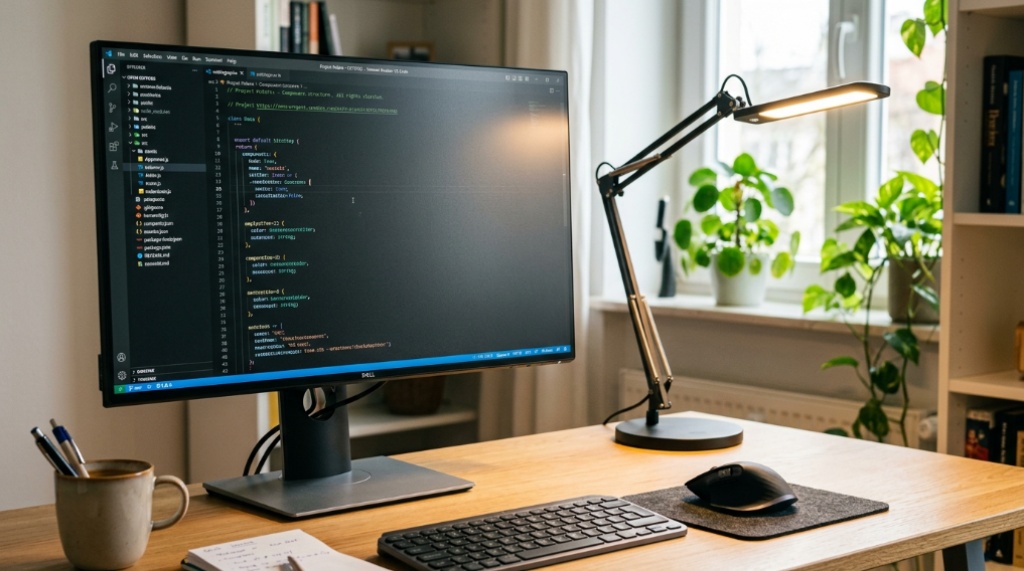
If you spend long hours studying for a certification in Philadelphia or working remotely from your Pittsburgh apartment, you have likely felt that familiar end-of-day eye strain, dryness, or headache that makes focusing difficult. The culprit is often not the amount of work, but the quality of your lighting. Harsh overhead fixtures and low-quality lamps create glare and invisible flicker that forces your eyes to work harder than necessary. Building a truly eye-friendly environment requires understanding how light interacts with your vision, starting with the right equipment. For many Pennsylvanians tackling dense reading materials, a flicker free led desk lamp for study and reading is the cornerstone of a setup that reduces fatigue and improves concentration. This guide explains exactly how to configure your space for optimal visual comfort.
Quick Answer
To create an eye-friendly study or work space in Pennsylvania, prioritize lighting that is flicker-free, has a high Color Rendering Index (CRI) above 90, and offers adjustable color temperature. Position your light source to avoid direct glare on your screen and paper. Combine this with a monitor at proper height and regular breaks using the 20-20-20 rule. The primary tool is a quality desk lamp that provides consistent, uniform light without the invisible strobe effect common in cheaper LEDs.
Key Takeaways
- Flicker is a hidden cause of eye strain; choose lamps explicitly labeled as flicker-free to ensure stable light output.
- Color temperature matters: use cooler light (4000K-5000K) for focused work and warmer light (3000K) for evening reading to support your circadian rhythm.
- Glare from reflective screens is often more damaging than insufficient light; position lamps to the side and slightly above your work area.
- High CRI (90+) ensures colors and text appear natural, reducing the effort your brain spends interpreting visual information.
Understanding the Role of Flicker in Eye Fatigue

Most modern LED bulbs convert alternating current (AC) to direct current (DC) using a driver circuit. In cheaper models, this conversion is incomplete, resulting in a light output that rapidly cycles on and off—often at 100 to 120 times per second. While your conscious brain does not register this strobe effect, your pupils and eye muscles constantly react to the changing light levels. Over a few hours, this creates a subtle but real neurological load that manifests as headaches, blurred vision, and difficulty concentrating.
Flicker-free lamps use a more sophisticated driver that smooths the current flow, producing a steady light output. When shopping, look for terms like “no flicker,” “flicker-free,” or “high-frequency driver” on the packaging. A simple test: point your smartphone camera at the lamp. If you see dark bands or a rolling shutter effect on your screen, the lamp is flickering. A true flicker-free lamp will appear steady and consistent in the camera view.
The Difference Between Visible and Invisible Flicker
Visible flicker is easy to spot—it is the annoying strobe effect you see when a light is dying or when it is filmed on a low-quality camera. Invisible flicker is more insidious because it operates above your conscious perception threshold. However, the physical effect on your eyes is similar. Your iris is constantly adjusting to the micro-changes in brightness, and your brain must process the inconsistent visual signal. Over a full workday, this creates a measurable decline in visual performance and an increase in reported discomfort.
Choosing the Right Light Color and Intensity
The color temperature of your light, measured in Kelvins (K), significantly impacts your alertness and comfort. A common mistake is using a single “daylight” bulb for every task. For deep focus and analytical work, such as reviewing spreadsheets or reading technical manuals, a cooler temperature around 5000K mimics midday sunlight and promotes alertness. However, using this same light late in the evening can suppress melatonin production, making it harder to fall asleep after a study session.
An ideal eye-friendly lamp offers adjustable color temperature. During the day, set it to 4000K-5000K to match your natural circadian rhythm. As evening approaches, shift to 3000K or warmer. This mimics the natural progression of sunlight and signals to your brain that the day is ending, reducing the risk of sleep disruption.
Lux Levels: How Much Light Is Enough?
Most desk tasks require between 300 and 500 lux of illumination on the work surface. Many standard lamps provide only 100-200 lux, forcing you to lean forward or squint. When selecting a lamp, check its lumen output and the beam angle. A focused beam with a wide coverage area is preferable to a narrow spot. The goal is uniform light across your entire desk, not just a small hotspot. If your current lamp creates harsh shadows on your paper, you likely need a larger diffuser or a higher-quality LED array.
Positioning Your Lamp and Monitor to Minimize Glare
Placement is just as important as the lamp itself. The classic mistake is placing the light source directly in front of you, which causes reflections on your monitor. For a screen-based workspace, position the lamp on your non-dominant side (left if you are right-handed). The light should be angled downward and slightly forward, so it illuminates your keyboard and documents without bouncing off the screen.
For reading physical books or printed documents, the lamp should be positioned to the side, opposite your writing hand. This prevents your hand from casting a shadow over the text. The top of the lamp shade should be roughly level with your forehead, ensuring the light source is not directly in your line of sight. This reduces direct glare into your eyes while maximizing illumination on the page.
Reducing Screen Reflections
Even with a good lamp, a glossy monitor can create problematic reflections. Tilt your screen slightly downward (about 10-15 degrees) so that the ambient light reflects toward the floor rather than into your eyes. Additionally, ensure your primary light source is not positioned directly opposite a window. If you have a window behind you, the light from the screen will reflect off the glass and create a halo effect. Use blinds or sheer curtains to diffuse harsh sunlight, creating a more balanced ambient light level in the room, for more tips on balancing digital habits, check out our guide on unseen drawbacks of ai-assisted studying.
Practical Setup Guide for a Pennsylvania Home Office
Pennsylvania’s variable climate—from sunny summer days to overcast winter afternoons—means your lighting needs will change seasonally. A fixed lighting setup rarely works year-round. Here is a step-by-step approach to building a flexible, eye-friendly space:
- Assess your ambient light: Turn off your task lamp and observe the room. If the ambient light is too dim (below 200 lux), you will need to supplement with overhead lights or a brighter lamp. If it is too bright or creates glare, diffuse it.
- Select a task lamp with adjustable features: Choose a model with a flexible arm or gooseneck so you can reposition it easily. Look for a stepless dimmer switch, allowing you to fine-tune brightness rather than just having three fixed levels.
- Set your color temperature: In the morning, set your lamp to 5000K. If you have a long work session, gradually reduce the temperature as the day progresses.
- Position your monitor: Place the top of your monitor at or slightly below eye level. The screen should be about an arm’s length away. Adjust your lamp to illuminate the desk surface, not the screen itself.
- Test for flicker: Use your smartphone camera to check the lamp for any rolling bands. If you see flicker, return the lamp immediately.
- Add bias lighting: If you work in a dark room, add a small LED strip behind your monitor. This reduces the contrast between the bright screen and the dark wall, which is a major cause of eye fatigue.
Comparing LED Technology: What to Look For
Not all LED lamps are created equal. The table below outlines the key differences between budget lamps and higher-quality eye-care models, helping you make an informed purchase decision.
| Feature | Basic LED Lamp | Eye-Caring LED Lamp |
|---|---|---|
| Flicker | Often present (100-120Hz) | Flicker-free driver (DC) |
| CRI (Color Accuracy) | Usually 70-80 | 90+ for natural color perception |
| Color Temperature | Fixed or limited options | Adjustable 3000K-5000K |
| Glare Control | Basic diffuser | Multi-layer diffusion and anti-glare coating |
| Dimming | On/off only or stepped | Stepless, continuous dimming |
| Durability | Standard LED lifespan | Higher-quality drivers for longer life |
The difference in CRI is particularly important for students and professionals who read charts, graphs, or color-coded documents. A low CRI lamp makes colors appear muddy, forcing your brain to work harder to differentiate between similar shades. A high CRI lamp renders colors accurately, reducing cognitive load.
Common Mistakes That Ruin an Eye-Friendly Setup
Even with the best lamp, several common errors can undermine your efforts. Avoiding these will significantly improve your comfort:
- Relying solely on overhead lighting: Ceiling lights often create harsh shadows and uneven illumination. They are a supplement, not a replacement, for task lighting.
- Using a lamp that is too bright: Excessive brightness can cause just as much strain as dim light. The lamp should illuminate your work, not flood the entire room.
- Ignoring screen brightness: Your monitor brightness should match the ambient light level. If your screen is brighter than your surroundings, it creates a high-contrast situation that fatigues the eyes.
- Forgetting to blink: When focusing on a screen, people blink up to 66% less frequently. This leads to dry eyes, which is a primary cause of discomfort. Use lubricating eye drops if necessary.
- Skipping the 20-20-20 rule: Every 20 minutes, look at something 20 feet away for 20 seconds. This allows your eye muscles to relax and reset their focus.
Seasonal Considerations for Pennsylvania Residents
Pennsylvania’s location in the northern hemisphere means significant variation in daylight hours. In December, Pittsburgh gets only about 9 hours of daylight; in June, it gets nearly 15. This variation directly impacts your workspace. During the darker months, you will rely more heavily on artificial light for longer periods. This makes the quality of your lamp even more critical. A flicker-free lamp with high CRI becomes essential for maintaining consistent visual performance during extended evening study sessions.
Additionally, the “gloom” of Pennsylvania’s cloudy winters reduces natural light levels dramatically. If your workspace is far from a window, you may need to run your task lamp at a higher brightness setting during the day to compensate. Conversely, during the bright summer months, you may need to dim your lamp to avoid glare. Having a lamp with a wide dimming range is essential for adapting to these seasonal shifts.
Frequently Asked Questions
Is a flicker-free lamp really necessary, or is it just a marketing gimmick?
It is a real physiological concern, not just marketing. While not everyone is sensitive to flicker, a significant portion of the population experiences headaches and eye strain from it. The effect is cumulative—you may not notice it in a 15-minute test, but after 4 hours of reading, the strain becomes apparent. Choosing a flicker-free lamp is a preventative measure that removes a variable that can negatively impact your visual comfort.
Can I use a regular LED bulb in my existing desk lamp?
You can, but you must check if the bulb is labeled as flicker-free. Many standard LED bulbs do flicker, even if you cannot see it with the naked eye. If you are using an older lamp with a dimmer switch, you must also ensure the bulb is compatible with dimming. Using a non-dimmable LED on a dimmer circuit will cause it to flicker severely.
What is the ideal color temperature for reading physical books?
For reading printed text, a neutral white light around 4000K is generally ideal. It provides enough contrast to make black text on white paper crisp without being too harsh. Warmer light (3000K) is better for relaxed reading before bed, while cooler light (5000K+) is better for intense study where you need maximum alertness.
How do I know if my lamp has a high CRI?
Check the product specifications. Most quality lamps will list their CRI rating. A CRI of 90 or above is considered good for tasks requiring accurate color discrimination. If the manufacturer does not list the CRI, it is likely lower than 80, which is insufficient for detailed visual work.
Should I use a lamp with a matte or glossy finish?
The finish of the lamp body matters less than the finish of the reflector and diffuser. You want a lamp with a diffuser that spreads light evenly. A matte diffuser will scatter light more effectively than a glossy one, reducing hotspots and glare. The lamp body finish is purely aesthetic.
Conclusion
Creating an eye-friendly workspace in Pennsylvania is not about buying the most expensive equipment; it is about understanding the principles of light quality, positioning, and consistency. Start by replacing any lamp that flickers, then adjust your color temperature to match the time of day, and finally, position your light sources to eliminate glare. These adjustments will reduce eye fatigue, improve concentration, and make your study or work sessions more productive. Your eyes are your most valuable tool—investing in a proper lighting setup is investing in your long-term visual health.